
Payment Widget
Overview
Payment Widget is a low-code script that adds Apple Pay and Google Pay buttons directly to the merchant's store – on product pages and/or in the cart – enabling one-tap checkout on supported devices without leaving your domain.
The problem we propose to solve
Long, multi-step checkouts and low-converting card forms hurt revenue. Reducing steps and keeping buyers on-page improves completion rates and trust.
About our solution
Embed payment widget where intention is highest (e.g., the product page) to skip the cart and complete payment in a secure native wallet sheet. No external redirects. Typical setup takes less than a day.
Key Benefits
- On-page payments: buyers pay without leaving your site
- Native wallets: Apple Pay & Google Pay out of the box
- SCA/PSD2 ready: 3DS2 is handled automatically for card flows when required by your acquirer
- Low-code integration: drop-in script, minimal config
- Reduced PCI scope: card data never touches your servers
- Flexible config & UI options: placement, amount, currency, callbacks, styles and more
- Apple domain verification made easy: guided one-file upload
- Fast Integration process: less than 1 day
Script connection
Adding file
On the merchant's page, in the <head> tag, it is necessary to add a link to the pay-buttons.js file.
The pay-buttons.js file must be located in the pay-buttons folder, on the same level with merchants folder (with payment pages).
Script declaration must contain id="pay-buttons".
<head>
  ...
  <script
    src="https://dev.bpcbt.com/payment/pay-buttons/pay-buttons.js"
    id="pay-buttons">
  </script>
  ...
</head>
Initialization
<script>
  document.addEventListener("DOMContentLoaded", function () {
    var widget = payButtonsWidget("containerId"); // where `containerId` is and id of the DOM-element where the buttons should be added

    widget.init({
      gatewayInfo: { // Information for Payment gateway
        token: "i29v9o5hkmuv2590l7661p9vcu", // Merchant's token
        amount: 852300, // Order amount in minor units
        returnUrl: "http\:\/\/yourwebsite.com\/success.html", // Target address after payment
        merchantLogin: "buttonApple",
      },

      applePay: { // Information for ApplePay session
        merchantId: "yourwebsite.com", // id of the merchant in Apple
      },

      googlePay: {
        environment: "TEST",
      },
    });
  });
</script>Initialization parameters
Below is the complete list of the parameters used for the script initialization.
| Required | Name | Type | Description |
|---|---|---|---|
| Optional | cartItems | Array of objects | Array of objects for description of the cart items. See nested parameters. |
| Optional | appleButtonClass | String | Class name that will be assigned to applePay button, in order to stylize the button separately or to address it. Default value: pay-button_applepay. |
| Mandatory | applePay | Object | Object containing information about Apple session. See nested parameters. |
| Optional | debug | Boolean | If true - debug mode is enabled, all service information will be shown under the button. Default value: false. |
| Mandatory | gatewayInfo | Object | Object containing information for the order in Payment gateway. See nested parameters. |
| Mandatory | googlePay | Object | Object containing information about Google Pay session. See nested parameters. |
Parameters of cartItems block
| Required | Name | Type | Description |
|---|---|---|---|
| Mandatory | name | String [1..255] | Name or the description of an item in any format. |
| Optional | itemDetails | Object | Object containing the parameters describing an item. The description of the nested elements is given below. |
| Mandatory | quantity | Object | Element describing the total of items of one positionId and its unit of measurement. The description of the nested elements is given below. |
| Optional | itemAmount | Integer [1..12] | The total cost of all instances of one positionId specified in minor denomination of the currency. itemAmount must be passed only if the itemPrice parameter has not been passed. Otherwise passing of itemAmount is not required. If both parameters itemPrice and itemAmount are passed in the request, then itemAmount shall be equal itemPrice * quantity, otherwise the request will return an error. |
| Optional | itemPrice | Integer [1..18] | Total cost of instance of one positionId specified in minor currency units. |
| Optional | itemCurrency | Integer [3] | ISO 4217 currency code. If the parameter is not specified, it is considered to be equal to the Order currency. |
| Mandatory | itemCode | String [1..100] | Number (identifier) of an item in the store system. |
Example of cartItems block:
[
  {
    name: 'Ball pen',
    quantity: {
        value: 1,
        measure: "pcs"
    },
    itemAmount: (totalAmount * 100) / 2,
    itemCurrency: "978",
    itemCode: 'number_1'
  },
  {
    name: 'Cheese',
    quantity: {
        value: 1.4,
        measure: "kg"
    },
    itemAmount: (totalAmount * 100) / 2,
    itemCurrency: "978",
    itemCode: 'number_2'
  }
]
Parameters of gatewayInfo object
| Required | Name | Type | Description |
|---|---|---|---|
| Mandatory | token | String | Token of the customer in administration console. It is necessary for customer identification. |
| Optional | registerPreAuth | Boolean | Registraion of two-stage payment. Default value: false. |
| Conditional | orderNumber | String [1..36] | Number of the order in the store system. Optional, if a setting to generate order number is enabled. |
| Optional | amount | Integer [0..12] | Payment amount in minor currency units (e.g. in cents). |
| Optional | currency | String [3] | ISO 4217 encoded currency key. If not specified, the default value is used. Only digits are allowed. |
| Mandatory | returnUrl | String [1..512] | The address to which the user will be redirected if the payment is successful. The address must be specified in full including the protocol used (for example, https://mybestmerchantreturnurl.com instead of mybestmerchantreturnurl.com). Otherwise, the user will be redirected to the address of the following type https://dev.bpcbt.com/payment/<merchant_address>. |
| Optional | failUrl | String [1..512] | The address to which the user is to be redirected in case of a failed payment. The address must be specified in full including the protocol used (for example, https://mybestmerchantreturnurl.com instead of mybestmerchantreturnurl.com). Otherwise, the user will be redirected to the address of the following type https://dev.bpcbt.com/payment/<merchant_address>. |
| Optional | description | String [1..598] | Order description in any format. To enable sending this field to the processing system, contact the technical support service. It is not allowed to fill this parameter with personal data or payment data (card numbers, etc.). This requirement is due to the fact that the order description is not masked in Merchant Portal and log files. |
| Optional | clientId | String [0..255] | Customer number (ID) in the merchant's system — up to 255 characters. Used to implement the functionality of stored-credential transactions. Can be returned in the response if the merchant is allowed to store credentials. Specifying this parameter in stored-credential transactions is mandatory. Otherwise, a payment will be unsuccessful. |
| Optional | sessionTimeoutSecs | Integer [1..9] | Order lifetime in seconds. If the parameter is not specified, the value specified in the merchant settings or the default value (1200 seconds = 20 minutes) will be used. If the request contains expirationDate, the value of sessionTimeoutSecs is not taken into account. |
| Optional | jsonParams | Object | A set of additional free-form attributes, structure:jsonParams={"param_1_name":"param_1_value",...,"param_n_name":"param_n_value"}Can be passed to the Processing Center for further processing (additional configuration required - contact support). Some predefined jsonParams attributes:
|
| Optional | orderBundle | Object | Object containing cart of items. The description of the nested elements is given below. |
| Optional | merchantLogin | String [1..255] | To register an order on behalf of another merchant, specify the merchant's API account login in this parameter. Can be used only if you have the permission to see the transactions of other merchants or if the specified merchant is your child merchant. |
| Optional | merchantName | String | merchantFullName in Payment gateway. Is necessary to display merchant's name in payment request api window. |
| Optional | dynamicCallbackUrl | String [1..512] | This parameter allows you to use the functionality of sending callback notifications dynamically. Here you can pass the address to which all "payment" callback notifications activated for the merchant will be sent. "Payment" notifications are callback notifications related to the following events: successful hold, payment declined by timeout, cardpresent payment is declined, successful debit, refund, cancellation. At the same time, callback notifications activated for the merchant that are not related to payments (enabling/disabling a stored credential, storing a credential) will be sent to a static address for callbacks. Whether the parameter is mandatory or not depends on the merchant configuration on Payment Gateway side. |
| Optional | ip | String [1..39] | Buyer's IP address. IPv6 is supported in all requests. (up to 39 characters). |
| Optional | expirationDate | String [19] | Date and time of the order expiry. Format used: yyyy-MM-ddTHH:mm:ss.If this parameter is not passed in the request, sessionTimeoutSecs is used to define the expiry of the order. |
| Optional | postAddress | String [1..255] | Delivery address. |
| Optional | feeInput | Integer [0..8] | Fee amount in minimum currency units. Must be enabled by respective Merchant-level permission in the Gateway. |
| Conditional | email | String [1..40] | Email to be displayed on the payment page. Customer's email must be passed if client notification is configured for the merchant. Example: client_mail@email.com.The email will not be validated on registration. It will be later validated on payment. |
| Optional | billingPayerData | Object | A block with the client's registration data (address, postal code) necessary for passing the address verification within the AVS/AVV services. Mandatory if the feature is enabled for the merchant on Payment Gateway side. See nested parameters. |
| Optional | shippingPayerData | Object | Object containing customer delivery data. It is used for further 3DS authentication of the client. See nested parameters. |
| Optional | preOrderPayerData | Object | Object containing pre-order data. It is used for further 3DS authentication of the client. See nested parameters. |
| Optional | orderPayerData | Object | Object containing data about the order payer. It is used for further 3DS authentication of the client. See nested parameters. |
| Optional | billingAndShippingAddressMatchIndicator | String [1] | Indicator for matching the cardholder's billing address and shipping address. This parameter is used for further 3DS authentication of the customer. Possible values:
|
A block with the client's registration data (address, postal code).
| Required | Name | Type | Description |
|---|---|---|---|
| Optional | billingCity | String [0..50] | The city registered on a specific card of the Issuing Bank. |
| Optional | billingCountry | String [0..50] | The country registered on a specific card of the Issuing Bank. Format: ISO 3166-1 (Alpha 2 / Alpha 3 / Number-3) or the country name. We recommend to pass a two/three-letter ISO country code. |
| Optional | billingAddressLine1 | String [0..50] | The address registered on a specific card of the Issuing Bank (A payer’s address). Line 1. Mandatory to be passed in order AVS verification works. |
| Optional | billingAddressLine2 | String [0..50] | The address registered on a specific card of the Issuing Bank. Line 2. |
| Optional | billingAddressLine3 | String [0..50] | The address registered on a specific card of the Issuing Bank. Line 3. |
| Optional | billingPostalCode | String [0..9] | Postal code registered on a specific card of the Issuing Bank. Mandatory to be passed in order AVS verification works. |
| Optional | billingState | String [0..50] | The state registered on a specific card of the Issuing Bank. Format: full ISO 3166-2 code, its part, or the state/region name. Can contain Latin characters only. We recommend to pass a two-letter ISO state code. |
| Mandatory | payerAccount | String [1..32] | Payer's account number. |
| Optional | payerLastName | String [1..64] | Payer's last name. |
| Optional | payerFirstName | String [1..35] | Payer's first name. |
| Optional | payerMiddleName | String [1..35] | Payer's middle name. |
| Optional | payerCombinedName | String [1..99] | Payer's full name. |
| Optional | payerIdType | String [1..8] | Type of the payer's identifying document provided. Allowed values:
|
| Optional | payerIdNumber | String [1..100] | Number of the payer's identifying document (e.g. passport) provided. |
| Optional | payerBirthday | String [1..20] | Payer's birth date in the YYYYMMDD format. |
Description of parameters in shippingPayerData object:
| Required | Name | Type | Description |
|---|---|---|---|
| Optional | shippingCity | String [1..50] | The customer's city (from the delivery address) |
| Optional | shippingCountry | String [1..50] | The customer's country |
| Optional | shippingAddressLine1 | String [1..50] | The customer's primary address (from the shipping address) |
| Optional | shippingAddressLine2 | String [1..50] | The customer's primary address (from the shipping address) |
| Optional | shippingAddressLine3 | String [1..50] | The customer's primary address (from the shipping address) |
| Optional | shippingPostalCode | String [1..16] | The customer's zip code for delivery |
| Optional | shippingState | String [1..50] | Customer's state/region (from delivery address) |
| Optional | shippingMethodIndicator | Integer [2] | Shipping Method Indicator. Possible values:
|
| Optional | deliveryTimeframe | Integer [2] | Product delivery timeframe. Possible values:
|
| Optional | deliveryEmail | String [1..254] | Target email address for delivery of digital distribution. Note that it is preferrable to pass the email in a separate email parameter of the request. The deliveryEmail parameter specified in this block is only used to fill MerchantRiskIndicator during 3DS authorization. |
Description of parameters in preOrderPayerData object:
| Required | Name | Type | Description |
|---|---|---|---|
| Optional | preOrderDate | String [10] | Expected date when delivery will be available (for pre-ordered purchases), in the format YYYYYYMMDD. |
| Optional | preOrderPurchaseInd | Integer [2] | Indicator of a customer placing an order for available or future delivery. Possible values:
|
| Optional | reorderItemsInd | Integer [2] | An indicator that the customer is rebooking a previously paid delivery as part of a new order. Possible values:
|
Description of parameters in orderPayerData object:
| Required | Name | Type | Description |
|---|---|---|---|
| Optional | homePhone | String [7..15] | Customer's phone number. It is always necessary to specify the country code, but you can specify or omit the + sign or 00 at the beginning. The number must be 7 to 15 digits long. Thus, the following options are valid:
|
| Optional | workPhone | String [7..15] | Customer's phone number. It is always necessary to specify the country code, but you can specify or omit the + sign or 00 at the beginning. The number must be 7 to 15 digits long. Thus, the following options are valid:
|
| Conditional | mobilePhone | String [7..15] | Customer's phone number. It is always necessary to specify the country code, but you can specify or omit the + sign or 00 at the beginning. The number must be 7 to 15 digits long. Thus, the following options are valid:
For payment by VISA with 3DS authorization, it is necessary to specify either phone or email of the cardholder. If you have a setting to display phone number on the payment page and have specified an invalid number, the customer will have a possibility to correct it on the payment page. |
Description of parameters in orderBundle object:
| Required | Name | Type | Description |
|---|---|---|---|
| Optional | orderCreationDate | String [19] | Order creation date in the following format: YYYY-MM-DDTHH:MM:SS. |
| Optional | customerDetails | Object | Block containing customer attributes. The description of the tag attributes is given below. |
| Mandatory | cartItems | Object | Object containing cart items attributes. The description of nested elements is given below. |
Description of parameters in customerDetails object:
| Required | Name | Type | Description |
|---|---|---|---|
| Optional | contact | String [0..40] | Customer's preferred way of communication. |
| Optional | fullName | String [1..100] | Payer's full name. |
| Optional | passport | String [1..100] | Customer's passport serial number in the following format: 2222888888. |
| Optional | deliveryInfo | Object | Object containing delivery address attributes. The description of the nested elements is given below. |
Description of parameters in deliveryInfo object.
| Required | Name | Type | Description |
|---|---|---|---|
| Optional | deliveryType | String [1..20] | Delivery method. |
| Mandatory | country | String [2] | Two letter code of the country of delivery. |
| Mandatory | city | String [0..40] | City of destination. |
| Mandatory | postAddress | String [1..255] | Delivery address. |
Description of parameters in cartItems object.
| Required | Name | Type | Description |
|---|---|---|---|
| Mandatory | items | Object | An element of the array containing cart item attributes. The description of the nested elements is given below. |
Description of parameters in items object.
| Required | Name | Type | Description |
|---|---|---|---|
| Mandatory | positionId | Integer [1..12] | Unique product identifier in the cart. |
| Mandatory | name | String [1..255] | Name or the description of an item in any format. |
| Optional | itemDetails | Object | Object containing the parameters describing an item. The description of the nested elements is given below. |
| Mandatory | quantity | Object | Element describing the total of items of one positionId and its unit of measurement. The description of the nested elements is given below. |
| Optional | itemAmount | Integer [1..12] | The total cost of all instances of one positionId specified in minor denomination of the currency. itemAmount must be passed only if the itemPrice parameter has not been passed. Otherwise passing of itemAmount is not required. If both parameters itemPrice and itemAmount are passed in the request, then itemAmount shall be equal itemPrice * quantity, otherwise the request will return an error. |
| Optional | itemPrice | Integer [1..18] | Total cost of instance of one positionId specified in minor currency units. |
| Optional | itemCurrency | Integer [3] | ISO 4217 currency code. If the parameter is not specified, it is considered to be equal to the Order currency. |
| Optional | itemCode | String [1..100] | Number (identifier) of an item in the store system. |
Description of parameters in quantity object.
| Required | Name | Type | Description |
|---|---|---|---|
| Mandatory | value | Number [1..18] | Number of items in one positionId. Use a decimal point as a separator in fractions. Maximal number of decimal places is 3. |
| Mandatory | measure | String [1..20] | The unit of measurement for the quantity of item instances. |
Description of parameters in itemDetails object.
| Required | Name | Type | Description |
|---|---|---|---|
| Optional | itemDetailsParams | Object | Parameter describing additional information regarding a line item. The description of the nested elements is given below. |
Description of parameters in itemDetailsParams object.
| Required | Name | Type | Description |
|---|---|---|---|
| Mandatory | value | String [1..2000] | Additional item info. |
| Mandatory | name | String [1..255] | Name of the parameter describing the details of an item |
Parameters of applePay block
See more details in the button constructor.
| Required | Name | Type | Description |
|---|---|---|---|
| Optional | buttonStyle | String | Button display style. Allowed values: black, white, white-outline. Default value: black. |
| Optional | paymentRequest | String | Description of Apple Pay payment session. The detailed description can be found in the official documentation. See the example below. |
| Optional | paymentType | String | Type of the payment button appearance. Allowed values: plain, buy, donate, set-up, book, subscribe. Default value: buy.For donate, book, subscribe types, the button width must be at least 200 px. |
| Mandatory | merchantId | String | merchantId in Apple, for example, website.com. This site will be also used as label in Apple Pay window. As it is limited by length, it is easier to display site domain. |
| Mandatory | language | String [2] | ISO 639-1 encoded key of the button language. |
Example of paymentRequest:
{
  countryCode: 'BG',
  currencyCode: 'BGN',
  supportedNetworks: [
    'masterCard',
    'visa',
    'electron',
    'maestro'
  ],
  merchantCapabilities: [
    'supports3DS',
    'supportsCredit',
    'supportsDebit'
  ],
  total: {
    label: '',
    amount: 1.00 // major units
  },
  requiredShippingContactFields: [
    'postalAddress',
    'name',
    'phone',
    'email'
  ]
}
Parameters of googlePay block
| Required | Name | Type | Description |
|---|---|---|---|
| Mandatory | environment | String | Environment. If not specified, the GPay button is not displayed. Allowed values:
|
| Optional | emailRequired | Boolean | Whether email should be asked during payment via PaymentRequest API. Default value: true. |
| Optional | phoneNumberRequired | Boolean | Whether phone number should be asked during payment via PaymentRequest API. Default value: true. |
| Optional | billingAddressRequired | Boolean | Whether billing address should be asked during payment via PaymentRequest API. Default value: true. |
| Optional | shippingAddressRequired | Boolean | Whether shipping address should be asked during payment via PaymentRequest API. Default value: false. |
| Optional | payerNameRequired | Boolean | Whether payer name should be asked during payment via PaymentRequest API. Default value: false. |
| Conditional | allowedCountryCodes | Array of String | List of country codes where shipping is available, in the ISO 3166-1 alpha-2 format. Mandatory, if shippingAddressRequired = true. |
| Optional | buttonColor | String | Google Pay button color. Allowed values:
default. |
| Optional | buttonType | String | Type of the label on the button. Allowed values:
short. |
Code generator
You can also quickly generate the code of Payment Widget script via Merchant Portal. To do so, go to Quick buttons -> Code generator tab in your Personal Area.
This page contains a constructor that looks like as follows:
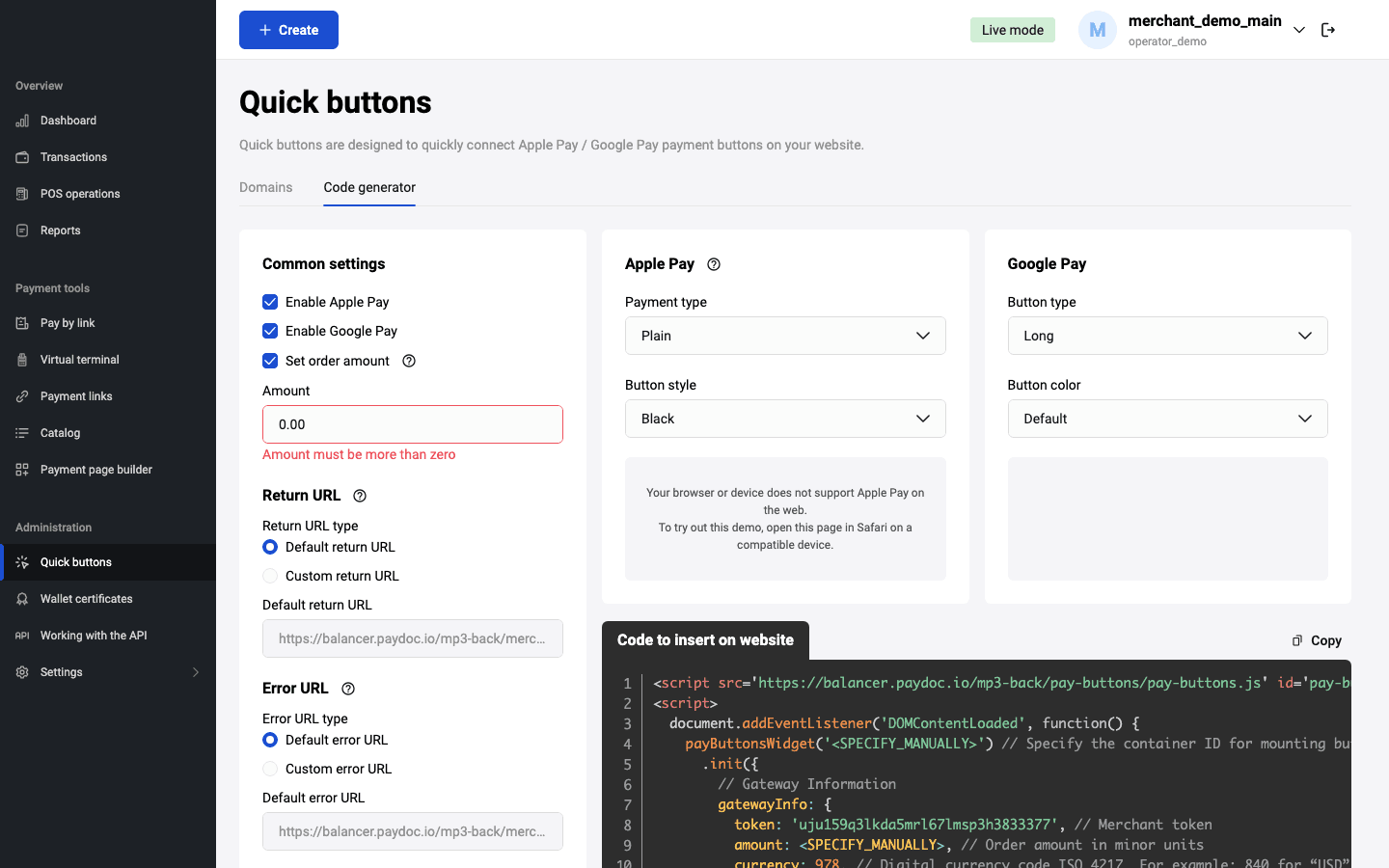
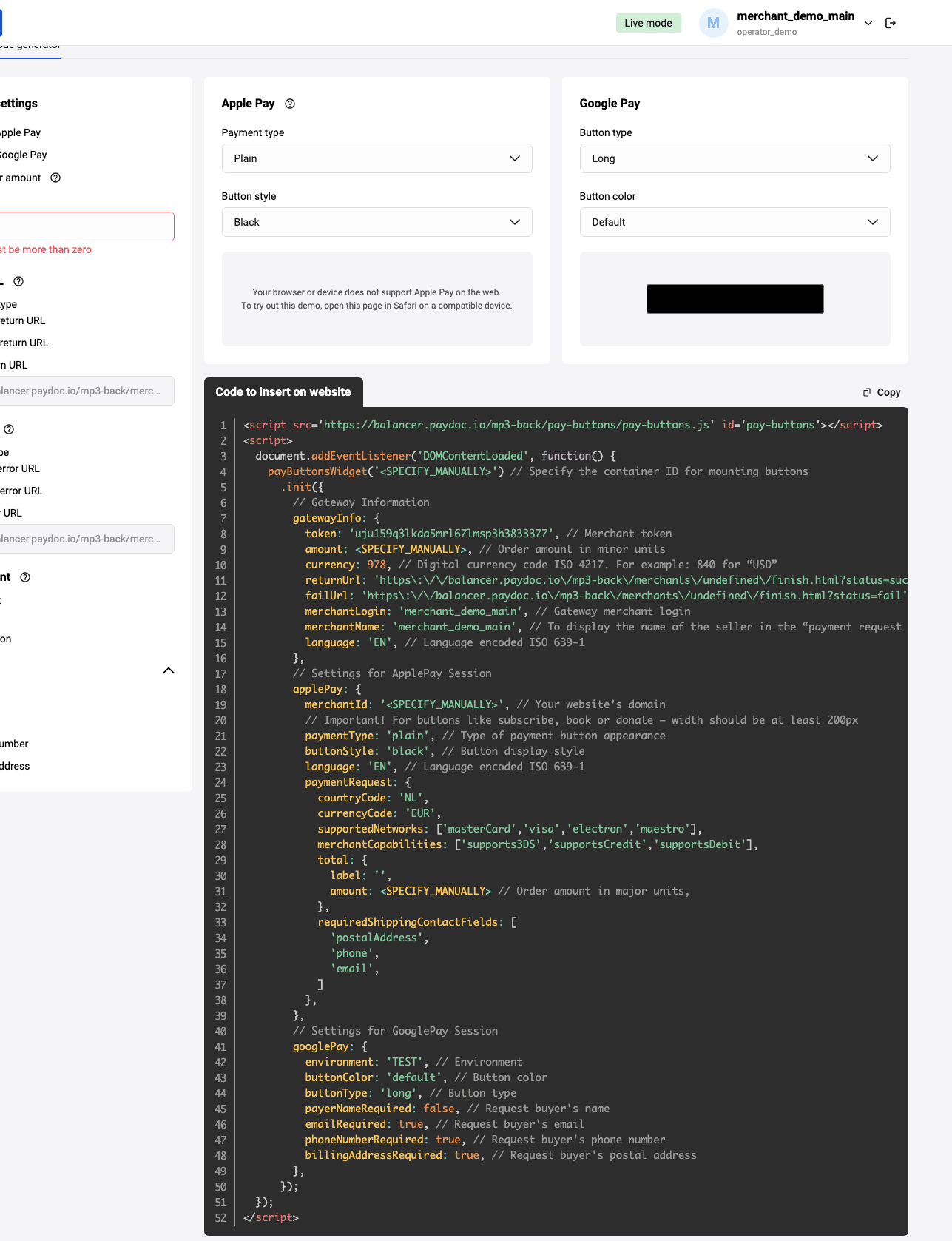
The tab has the following sections that contain parameters for the script initialization:
- Common settings - specify the common information for order generation in Payment Gateway:
- Enable payments via Apple Pay and/or Google Pay payments,
- Order number,
- Amount (mandatory),
- Currency (select from the list),
- Language (select from the list),
- Environment where you want to use the script (Test or Production).
- Succesful payment page and Failed payment page (specify URL or select standard URL).
- User data request - specify the data that should be required during payment via PaymentRequest API for Google Pay. Select corresponding check boxes: Name, Email, Phone number, Postal address.
- Payment button settings - specify button type and style for Apple Pay and Google Pay buttons. You can see the buttons preview in this section.
- Code to embed on your page - this section displays preview of the script initialization code according to the specified parameters. This code should be embedded on your page.
Supporting by browsers
| Environment / Browsers | Apple Pay | Google Pay |
|---|---|---|
| iOS / iPadOS — Safari | Yes | Yes (web checkout) |
| iOS / iPadOS — Chrome / Edge / Firefox | Yes (iOS 16+) | Yes (web checkout) |
| macOS — Safari | Yes | Yes |
| macOS — Chrome / Edge / Firefox | Yes, via QR (iOS 18+) | Yes |
| Windows / Linux / ChromeOS — Chrome / Edge / Firefox | Yes, via QR (iOS 18+) | Yes |
| Android — Chrome / Edge / Firefox | Yes, via QR (iOS 18+) | Yes |
Testing and deployment
Test environment (UAT)
Connect the script with https://dev.bpcbt.com/payment/ address.
<script
  src="https://dev.bpcbt.com/payment/pay-buttons/pay-buttons.js"
  id="pay-buttons">
</script>
Production environment (PROD)
Connect the script with https://dev.bpcbt.com/payment/ address.
<script
  src="https://dev.bpcbt.com/payment/pay-buttons/pay-buttons.js"
  id="pay-buttons">
</script>